
Product Announcements
DataRemote Launches MCP to Bring AI Device Management to POTS IN A BOX® Fleets
On October 7, 2026, DataRemote announced the DataRemote MCP, a Model Context Protocol server that lets AI assistants answer questions about — and, once changes are switched on, manage — the POTS IN A BOX® devices on a customer's Ara account. It is read-only by default and runs on the customer's own computer.
Issued by DataRemote, Inc. · Distributed via ACCESS Newswire on · Also published by Yahoo Finance and The Globe and Mail.
Key facts
- Issued by DataRemote, Inc. on October 7, 2026, and distributed through ACCESS Newswire.
- The DataRemote MCP is a Model Context Protocol server for Ara, DataRemote's device management platform.
- Supported models: 90X1, 90X2, 90X5, VAB-1, DRI-9080, CDS-9010, CDS-9070 and CDS-9090.
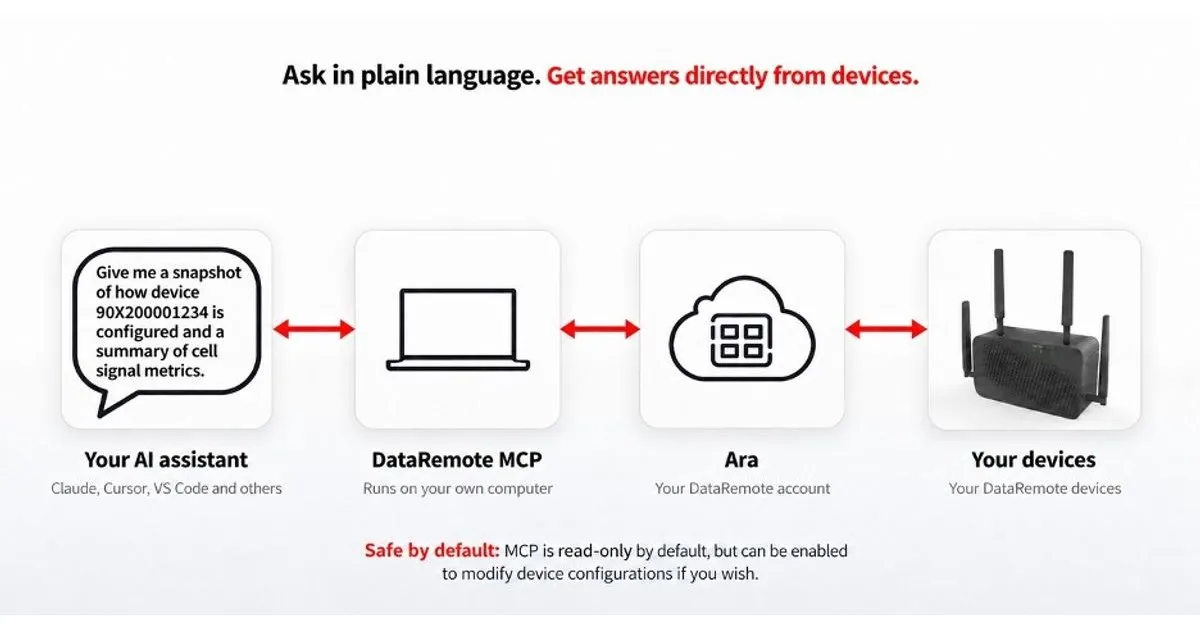
- It runs on the customer's own computer (Python 3.10 or later) and works through DataRemote's API; it never connects to devices directly.
- Read-only by default: tools that change a device or an account are withheld until changes are switched on in the MCP's own settings.
- Offered to DataRemote customers, with the source available to customers and partners.
- Certification implications: none. The MCP is software on the customer's computer and does not change any device's certifications, listings or carrier approvals.
MIAMI, FL / ACCESS Newswire / October 7, 2026
DataRemote, Inc. announced on October 7, 2026, the launch of the DataRemote MCP, an AI-enabled Model Context Protocol server for Ara, DataRemote’s device management platform. According to the announcement, Ara manages more than half a million deployed devices across the U.S. The MCP lets a supported AI assistant look up, diagnose and — when the customer allows it — manage the devices on their account in plain language, with the aim of faster data retrieval, decision-making and troubleshooting.
“Our customers already have a trusted AI assistant as part of their daily workflow. We built our MCP so that their assistant can now answer the questions they used to call us for: which unit is offline, why, and what to do about it.”
— Briam Rodriguez, Senior Vice President of Engineering, DataRemote
What changed
- Before: customers managed their DataRemote devices through the Ara interface or Ara’s developer API. Answering a fleet question meant navigating Ara, building an integration, or contacting DataRemote support.
- After: customers can connect an MCP client that supports a locally running server to their DataRemote account and ask about their devices in plain language. The connection is read-only by default; once a customer switches changes on, the assistant can also change settings, restore configurations and send device commands.
DataRemote describes the MCP as the foundation for future AI-powered features focused on streamlining connectivity and protecting customer data.
How it works
A question typed into the assistant passes to the DataRemote MCP, which runs on the customer’s own computer and turns it into requests to DataRemote’s API in Ara. Ara reaches the device, and the answer comes back to the assistant. The MCP never connects to a device directly, and it acts only with the permissions of the customer’s own DataRemote account.
Animated illustration: a question typed into an AI assistant passes through the DataRemote MCP to DataRemote Ara, which reaches fleet, telemetry, diagnostic or configuration data, and the answer appears in the assistant. Use the example buttons below it to switch questions or pause the animation.
Your AI assistant
Read-only
Which devices in my Southeast collection are offline?
DataRemote Ara · Fleets & collections
Southeast collection
- Devices
- 48
- Online
- 45
- Offline
- 3
- 90X200001187offline 2 h
- 90X200004410offline 35 min
- 90X200002903offline 6 h
Are the FXS lines on 90X200001234 registered?
DataRemote Ara · Status & telemetry
90X200001234 · FXS lines
- FXS 1registered
- FXS 2registered
Both phone lines are registered.
Diagnose 90X200001234 and tell me what you couldn’t check.
DataRemote Ara · Diagnostics
Diagnosis · 90X200001234 incomplete
- Connectivitynormal
- LTE signalnormal
- FXS registrationnormal
- Batteryunknown
This model didn’t report battery, so I can’t call it healthy.
Back up the configuration of 90X200001234.
DataRemote Ara · Configuration
Configuration backed up
- Saved toyour backups folder
- Recordmodel · firmware · checksum
- Restore tothis device only
Restoring it later needs changes switched on.
Illustrative example. Serial numbers, collection names and readings are not from real devices.
“When our customers make investments in large-scale infrastructure upgrades, they want the confidence they can be managed and supported into the future. By adding new AI capabilities, we are giving them a powerful set of tools to do just that.”
— Timor Brik, Chief Operating Officer, DataRemote
Availability and requirements
- Availability: announced October 7, 2026, and offered to DataRemote customers through DataRemote sales or a Tier 3 support representative.
- Where it runs: on the customer’s own computer, with Python 3.10 or later. Device data the customer asks about is returned to the AI assistant they use, so that assistant’s data policies apply.
- AI assistants: MCP clients that support a locally running server over standard input/output (stdio), the transport this release implements. Supporting MCP alone does not establish compatibility. The announcement names Claude, ChatGPT, Copilot, Cursor and VS Code among the assistants that speak MCP.
- Account: the customer’s existing DataRemote sign-in. Credentials can be kept in a password manager such as 1Password so the password is never written to disk, and by default sign-in is refused over an unencrypted connection.
- Source code: available to existing customers and partners to read, run and adapt. Subject to their agreement with DataRemote, partners may run it on their own systems to manage devices on accounts they are authorized to access, including for their own customers; the MCP itself may not be sold, bundled into a paid product, or offered as a hosted service.
Supported models
The DataRemote MCP supports the 90X1, 90X2, 90X5, VAB-1, CDS-9010 and CDS-9090, plus the CDS-9070 and DRI-9080. Not every model reports every reading; a value a device does not send is reported as unknown, never as zero.
What customers can do with it
| Capability | Changes off (default) | Changes on |
|---|---|---|
| Check a device: model, firmware, online state, last contact, uptime, live communication test | Yes | Yes |
| Health and telemetry: CPU, memory, load, power and battery, LTE signal quality (RSRP, RSRQ, SINR), SIM state, interface errors, FXS registration | Yes | Yes |
| Troubleshoot: diagnosis, alarm check, syslog search, debug snapshots, power and connection history | Yes | Yes |
| Find and read settings by name | Yes | Yes |
| Fleet views: collections, online and offline counts, which collections hold a device | Yes | Yes |
| Back up a configuration to a local file; check a queued command | Yes | Yes |
| Change settings and apply staged changes | No | Yes |
| Upload, set or restore a configuration | No | Yes |
| Reboot, factory reset and firmware update | No | Yes |
| Add devices to or remove them from a collection | No | Yes |
This table records the capabilities at launch; the DataRemote MCP product page is kept current and carries example questions and the full set of controls.
Controls and safeguards
- Read-only by default. Change tools are withheld from the assistant until changes are switched on in the MCP’s configuration. MCP tool calls cannot enable them; the server configuration must be changed separately.
- Factory reset and firmware update are refused unless the request includes an explicit confirmation value. The assistant supplies that value, so it is a required check rather than an independent human approval; the assistant is expected to confirm the device serial number with the user first.
- Answers state what is unknown. A missing reading is reported as unknown rather than zero, and a diagnosis says what it could and could not check.
- Restores are protected. By default, a restore takes a safety backup and stops if it fails, unless the user explicitly requests proceeding without one. A restore goes only onto the device the backup came from unless explicitly allowed otherwise, and refuses a backup altered since it was saved.
- Commands are not automatically resent. Reboot, reset and firmware commands return as queued with an ID. Commands that time out are reported as unknown and are not automatically resent by the MCP server.
- Device text is labelled. Log lines and other text reported by devices arrive marked as untrusted. The label is guidance for the assistant to treat them as data rather than instructions; it does not filter the content or guarantee how an assistant behaves.
What the MCP does not do
- It does not connect to devices directly or see anything DataRemote’s API does not expose.
- It does not go beyond the customer’s own account and permissions.
- It does not decrypt sealed configurations or diagnose an offline device; it reports that a device is offline and when it was last seen.
- It does not change any device’s hardware capabilities. Its availability has no effect on certifications, listings or carrier approvals, which remain model-specific and are documented in the Trust Center.
About Ara and POTS IN A BOX®
Ara is DataRemote’s device management platform for provisioning, monitoring and troubleshooting DataRemote devices, with a developer API for integrating provisioning, monitoring and billing into other systems. POTS IN A BOX® is DataRemote’s family of 5G and LTE appliances — cellular gateways and integrated access devices — that replace analog copper lines for voice, fax, alarm, elevator and M2M connections, with battery backup and automatic cellular failover. Capabilities and certifications vary by model; see each product page.
About DataRemote, Inc.
Since 1991, DataRemote has built machine-to-machine and cellular technology, specializing in cellular routers and modems that replace TDM wireline circuits, backed by engineering and sales support. Its hardware serves enterprises across retail, healthcare, oil and gas, utilities, transportation, manufacturing, construction and government.
Updated October 14, 2026: removed a reference to battery-health estimates, which are not part of the customer release, and clarified client compatibility (locally running MCP servers), the reset and firmware confirmation, restore backups, command retries and device-text labelling.
This article is about
DataRemote MCPA Model Context Protocol server for Ara that lets MCP clients that support a locally running server answer questions about, and (when changes are switched on) manage, the devices on a customer’s DataRemote account. Read-only by default.
Entities mentioned
Sources and references
- What is the Model Context Protocol (MCP)? (opens in a new tab) — Model Context Protocol
Frequently asked questions
The launch of the DataRemote MCP, a Model Context Protocol server for the Ara device management platform. It lets MCP clients that support a locally running server answer questions about the DataRemote devices on a customer's account, and, once changes are switched on, make changes to them.
Not by default. Tools that change a device or an account are withheld until changes are switched on in the MCP's own configuration; MCP tool calls cannot enable them, so the configuration must be changed separately. Even then, the server refuses a factory reset or firmware update unless the request includes an explicit confirmation value. The assistant supplies that value, so it is a required check rather than an independent human approval.
No. The MCP is software that runs on the customer's computer and works through DataRemote's API. It does not change any device's certifications, listings or carrier approvals.
It is offered to DataRemote customers. Contact DataRemote sales at [email protected] or a Tier 3 support representative.